Hello!
Today, the Twigmo team has released a new version of the CS-Cart mobility kit.
Twigmo 2.4 includes the first additional skin (we called it Handbag) and language selector:
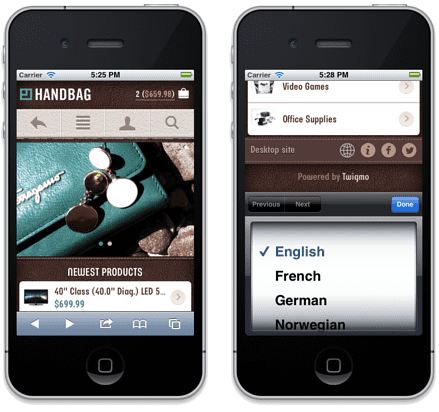
The new skin can be selected from the Twigmo add-on settings page (in the CS-Cart admin panel) after upgrading to version 2.4. The look and feel of the new skin is editable separately from the
default one, because it has its own custom CSS file (located in the skins/basic/customer/addons/twigmo directory of a CS-Cart installation).
The added language selector (displayed at the bottom of the mobile site) allows a customer to change the language manually (in most cases, this will not be necessary, because Twigmo detects the client’s mobile browser language automatically). The available languages comes from the desktop version of the online store (powered by CS-Cart).
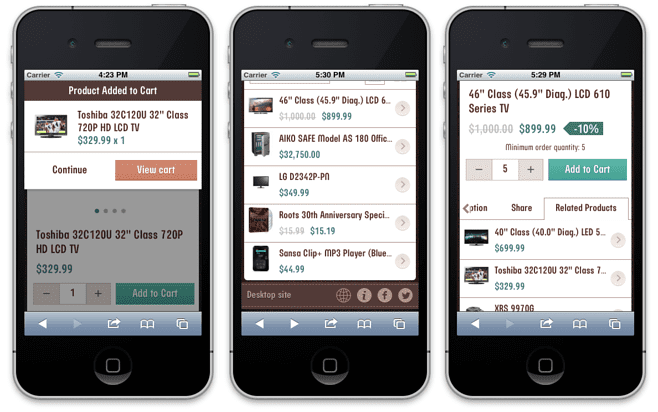
Another important improvement is the revamped Add to cart scenario, based on client feedback. Instead of the Twigmo standard notification, we now display a pop-up dialog box (see the screenshot below). An effort has been made to make every next step obvious and clear for customers.
Apart from that and some bug fixes, Twigmo 2.4 introduces:
- Payment instructions displayed on the order details page
- Discount prices displayed on the category and product details pages
- Support of additional product tabs (only product, category, and HTML blocks) on the product details page
- Pop-up notifications disappear either on timeout or by tapping
The full list of changes is available on our site.

Upgrade
Twigmo 2.3 users will receive notification about the available upgrade in their CS-Cart admin panels. The upgrade process is fully automatic, but it must be initiated manually on the Upgrade tab of the Twigmo add-on settings page.
In order to upgrade Twigmo manually from version 2.2 or an earlier version, follow the manual upgrade guide.
We are always happy to hear from you. Help us make Twigmo better by reporting bugs and sharing ideas.
Follow us on Twitter and Facebook to be the first to learn of new feature votings and Twigmo news.
Hello,
thanks for the new update
I’ve done the upgrade but I have not seen changes!
Thank you
Ilias
Hello,
We’ve tried accessing your website and the language selector is there. You should just refresh the page, or clear your browser cache if that doesn’t help.
You can pick the skin in the Twigmo add-on settings (admin panel, Administration -> Add-ons -> Twigmo), in the Mobile Front-End tab: http://puu.sh/1JLwO
Hello,
the theme for the language RESOLVED just not seeing without my glasses!!!!
The other issue with the skin and this was solved
not opening all the content of this page so they do not see the drop down menu to change skin
all works amazingly well now
if you will be the background color to become a little lighter?
Thank you
Ilias
Glad everything sorted out!
The best way to let the Twigmo developers know what you want is via the UserVoice. It is regularly revised and the votings are published in Twitter.
Twigmo dont support Pages, ? If you are on mode of Twigmo only product show not pages etc .
Dear Sam,
Twigmo does support pages, all you have to do is set the option Home page content to ‘Twigmo home page blocks’ in the Twigmo settings (the Mobile Front-End tab): http://puu.sh/1JLBv. To access it, go to Administration -> Add-ons -> Twigmo in your store admin panel.
pages appear to me
but not appears the new skin and the choice of language
Dear Ilias,
Please, try refreshing the page. The language selector is visible on your site from our side.
Best Skin Thank you
Thank you! Much appreciated!
Hi there
I have selected Twigmo to only “phones” in settings, but when i browse my site with an iPad i keep getting a message on top of the screen: “visit our mobile site”. How can i get rid of that message. And by the way its not working anyhow. If i click on it i am not redirected to the mobile version. Thanks !
Hi,
Thank for pointing it out!
This issue has been posted on our forum, and the devs are already working on it. The fix is going to be published tonight in the thread.
UPD: The fix is available http://forum.cs-cart.com/topic/29705-twigmo-error/page__hl__twigmo__fromsearch__1
I heard that Twigmo has started working for the Mobile Admin application for Android and i hope it will be released soon. Any way the front end design is looking good and one more fine release from Twigmo.
Dear Sakhti,
Thank you for the kind words!
Yes, the mobile admin application for Android is currently under development. I cannot tell you the estimated release date, though, as it is not yet confirmed.
When checking out the inventory for items with multiple options. Even though all those options show inventory of 0 through the site the app for checking twigmo on the iphone shows that there is a stock level of 1.
Dear Nico,
Please contact the Twigmo developers via Customer Help Desk.